
Removes Scratches From Damaged Images: A Practical Guide to Protect and Restore Your Memories
Some moments deserve to last forever—weddings, maternity, the earliest days of a newborn, family reunions. Photographs are our link to these treasured milestones. Yet, even the most cherished images can fall victim to damage over time. Scratches, fading, and loss of detail may threaten the very memories we wish to keep alive. Understanding how to remove scratches from damaged images and protect your photos means future generations can experience your story too. In this comprehensive guide, you’ll learn practical steps for scratch removal, discover session tips, understand common mistakes to avoid, and see how studios like Video Studio Jimenez can help you keep your memories vivid for years to come.
Why Photographic Memories Matter
Moments That Can’t Be Replaced
Your wedding, the anticipation of maternity, the first portraits of your newborn, or a multi-generational family photo—these are events that cannot be recreated. A photograph is more than paper or pixels; it’s a portal to emotion, family history, and personal legacy.
Professional vs. Casual Photography
A professional photographer goes beyond simply taking a picture. They understand light, composition, timing, and emotion. While smartphone snapshots are great, they often miss the finesse and staying power of professionally captured images. Moreover, pros offer restoration and archival-quality services to rescue old photos, unlike standard prints.
Discover strategies to preserve your photos for future generations
Types of Photo Sessions Impacted by Scratches and Damage
What to Expect From Each Photo Session
- Wedding Sessions: Complex, often including pre-wedding, ceremony, and reception shots. May combine studio and location photography.
- Maternity Sessions: Focused on the expecting parent(s), usually in studio or natural environments, conveying emotion and anticipation.
- Newborn Photography: Time-sensitive (first 2 weeks), gentle setups, controlled light, often in-studio for safety.
- Studio Portraits: Controlled lighting, backgrounds, and post-production—versatile for families, individuals, or official documents.
- Photo Restoration: Digital or manual restoration of damaged prints, focusing on details like scratches or color fading.
- Passport Photos: Professional lighting and composition, compliant with regulations.
Choosing the Right Location
- Studio: Consistent lighting, privacy, best for newborns, formal or restoration sessions.
- Outdoor: Natural light, scenic backgrounds, ideal for families or maternity.
- Home/Event Venues: Comfortable, context-rich, weddings and multi-generation portraits.
| Session Type | Location | Typical Duration | Deliverables |
|---|---|---|---|
| Wedding | Venue/Studio | 4–12 hours | Album, digital gallery, prints |
| Maternity | Studio/Outdoor | 1–2 hours | Edited digital images, prints |
| Newborn | Studio | 1–2.5 hours | Edited images, album |
| Family/Studio | Studio | 1 hour | Portrait prints, digital files |
| Restoration | Studio/Digital | Varies (days-weeks) | Digitized files, restored prints |
| Passport | Studio | 20 mins | Prints |
Common Mistakes When Planning or Choosing a Photographer
Overlooking Restoration Capabilities
Not all photographers offer professional scratch removal or restoration. Verify experience and see before-after samples, especially if you plan to revive old or damaged images.
Failing to Communicate Expectations
A lack of clear communication about style, mood, and desired results can lead to disappointment. Make a list of expectations and discuss them beforehand.
Ignoring Print and Backup Options
Settling for digital-only copies means risking data loss. Always ask about high-quality prints, albums, and cloud backups to safeguard your photos.
- Tip: Avoid assuming every photographer offers restoration—ask specifically.
- Review portfolios for similar restoration or scratch removal projects.
- Discuss storage and delivery in advance.
Read about common mistakes in photo restoration
Preparing for a Successful Photo Session
Advance Preparation
- Select outfits according to the session and background—avoid distracting patterns for studio or restoration sessions.
- Gather any props or family heirlooms to be included, especially for newborn or restoration shoots.
- Review the photographer’s checklist and clarify any doubts early.
What to Bring and Communicate
- Bring clean, undamaged prints if restoration is needed—handle by the edges to minimize further scratching.
- Share your photo history: who’s in the image, what story matters most, special editing requests.
Feeling Comfortable in Front of the Lens
- Meet or call the photographer beforehand to build rapport.
- Ask them to explain the process and what to expect, especially with children or special needs.
- Take breaks when needed—professional studios like Video Studio Jimenez allow time for comfort.
From Session to Delivery: Formats, Backups, and Preservation
Delivery Formats: Digital and Print
- High-resolution digital images (JPG, TIFF)
- Archival quality prints and albums for longevity
- Special editions: canvas prints, custom frames, passports
Backup and Long-Term Storage
- Keep digital files on two different devices/cloud solutions.
- Store prints in acid-free albums, away from sunlight and moisture.
Explore strategies for safeguarding your photos in digital format
Restoring Old Photos and Removing Scratches
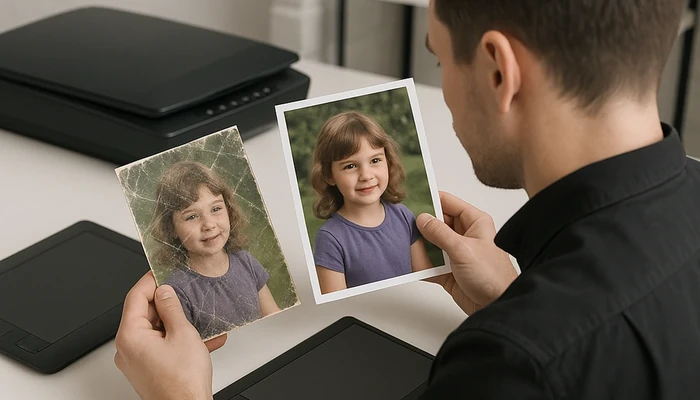
Professional studios use advanced software and manual retouching to digitally remove scratches from damaged images. The restoration process usually includes careful scanning, spot removal, tone balancing, and fine retouching. Professionals preserve the character and emotional value of the original photo, ensuring memories are both vibrant and authentic.
See ideas for quality restoration of old pictures
FAQs: Removing Scratches From Damaged Images and More
How are scratches removed from damaged images?
Specialized photo restoration software and expert retouchers meticulously remove visible defects, using digital brushes, cloning, and color correction to blend and repair affected areas.
Can all photo scratches be fully removed?
Most scratches can be dramatically minimized or erased, but deep or heavy damage may require time-consuming manual touch-up. Some texture or imperfections may remain visible upon close inspection.
Is DIY scratch removal safe for precious or delicate photos?
DIY methods can lead to further damage. For irreplaceable prints, always consult a professional studio like Video Studio Jimenez.
How can I prevent new scratches on my photos?
Store photos in acid-free sleeves or albums, avoid direct handling, and keep them away from direct sunlight or humidity. Digitize and back up old prints.
Can digital photos get ‘scratches’?
Not exactly, but digital files can be corrupted or degraded; always keep multiple backups and use quality storage media.
What should I do before bringing photos for restoration?
Handle prints gently, avoid using tapes or adhesives, and place them in protective covers. Provide historical context or stories if available, as these can help guide restoration work.
Is photo restoration only for old family photos?
No. Restoration can improve recent prints affected by mishandling, pets, accidents, or poor storage. It is also invaluable for preserving wedding, maternity, or newborn portraits.
Are restored images suitable for enlargement?
Yes, professional restoration maintains or rebuilds detail, allowing for quality enlargements and new prints.
How long does the scratch removal process take?
Time required depends on damage extent and project load. A simple removal might take a day, while complex restoration needs more time. Discuss timelines with the studio in advance.
Next Steps: Preserving, Restoring, and Enjoying Your Photographic Memories
Investing in the restoration and preservation of your photos means giving your family, now and in the future, a chance to relive your most precious moments. Whether it’s the careful removal of scratches from damaged images or planning a new professional session, thoughtful preparation and expert support make all the difference. If you’re ready to renew an old family photo, preserve your wedding day, or prepare for a meaningful portrait session, explore all your options and work with a trusted studio who understands memory, legacy, and care.
Curious about how you can revitalize your most treasured photos? Learn more about our photo restoration services or schedule your session with Video Studio Jimenez today. Every step and story matters!
About Video Studio Jimenez
Video Studio Jimenez is a professional photography studio guiding couples and families in Chicago, Illinois and the surrounding area through special milestones. From wedding and maternity photography to newborn portraits, studio sessions, passport photos, and restoration of cherished heirlooms, our experienced team ensures every memory is captured with care and preserved for generations.
- Want unique gift ideas for restored photos? See our creative tips for gifting restoration projects.
- Need expert advice on photo restoration software? According to these Photoshop restoration experts, digital techniques combined with careful manual work deliver outstanding results, preserving the authenticity of even the most worn images.
- Looking for hands-on restoration and framing guidance? This detailed guide covers the essentials of photo rehabilitation and display, ensuring your restored images remain centerpieces in your home.
Professional Photographer, Chicago Photo Restoration, Photo Restoration Chicago Il, digital photo restoration Lakeview, digital photo restoration Countryside, professional photo restoration East Ravenswood, digital photo restoration Evanston, restore old photos Elgin, restore old photos Alta Vista Terrace, old photo restoration Round Lake