
Strategies for Preserving Old Photos in Digital Format: A Complete Guide
Special moments like weddings, maternity journeys, newborn milestones, family portraits, and even obtaining official passport photos are the milestones that shape our family’s legacy. Capturing and preserving these memories goes beyond taking a picture—it’s about securing a piece of your story for years to come. Whether you’re searching for strategies for preserving old photos in digital format or evaluating options for upcoming photography sessions, understanding how to properly document, protect, and cherish these images is essential. In this guide by Video Studio Jimenez, you’ll discover not only professional preservation strategies but also actionable tips for preparing for your next photo session and avoiding common mistakes.
Why Professional Photography and Photo Preservation Matter
Moments That Don’t Repeat: Weddings, Pregnancy, and Beyond
Life is full of unique milestones—from saying “I do” at your wedding, to maternity photos capturing the anticipation before your baby’s arrival, to newborn sessions immortalizing those precious first weeks. These moments are fleeting, and photographs serve as timeless reminders. Memories can fade, but a preserved image keeps emotions alive for generations.
The Difference: Casual Snapshots vs. Professional Photography
While smartphones make it easy to snap an image anytime, professional photography brings expertise in lighting, composition, emotion, and storytelling. Professional editing, safe handling, and the ability to restore or digitize cherished old photos create results that stand the test of time—critical when these images become family heirlooms.
For unique preservation ideas, see our post on creative gift ideas for restored photos.
Photo Sessions & Digital Preservation: An Overview
What to Expect: The Structure of a Professional Session
- Consultation: Discuss your preferences, whether you’re planning a wedding, maternity, newborn, or passport photoshoot.
- Planning: Review wardrobe, location, style, and timing.
- Shooting: Collaborate with the photographer for natural, emotive images reflective of your story.
- Post-production: Professional editing and retouching ensures your personality shines through.
- Delivery: Receive your images in digital and physical formats for optimal preservation.
Choosing a Location: Studio, Outdoors, Home, or Event Venue
The choice of location shapes the mood and outcome of your session:
- Studio: Controlled lighting, privacy, ideal for portrait, newborn, and passport photos.
- Outdoor: Unique landscapes, soft natural light, perfect for weddings and maternity sessions.
- Home: Personal atmosphere, especially suitable for newborns and family memories.
- Event Venues: Large gatherings such as weddings or christenings.
| Session Type | Best Location | Duration | Usual Deliverables |
|---|---|---|---|
| Wedding | Event Venue/Outdoors | 4–10 hrs | Albums, prints, digital files |
| Maternity | Outdoors/Studio | 1–2 hrs | Prints, digital downloads |
| Newborn | Studio/Home | 1.5–3 hrs | Albums, prints, digital files |
| Studio Portrait | Studio | 30–90 mins | Headshots, digital files, passport photos |
For a professional studio experience, explore our session options.
Common Mistakes in Planning or Choosing a Photo Session
Overlooking Photographer’s Experience
Choosing an inexperienced photographer may result in poorly captured or lost moments. Always check credentials, reviews, and past work.
Focusing Only on Price
Quality and expertise have real value. Choosing solely based on price often means sacrificing editing quality, safety, or even long-term preservation.
Neglecting Image Archival Options
Don’t assume digital files guarantee safe, long-term preservation. Discuss digital delivery methods and backup options before booking.
- Pro tip: Ask your photographer about backup systems and restoration expertise.
To avoid mistakes, read our guide to common photo restoration mistakes.
Best Practices: Preparing for Your Session and Preservation
Getting Ready: Checklist for Clients
- Identify the session purpose (wedding, maternity, newborn, family, passport, or restoration).
- Coordinate outfits and accessories in advance.
- Discuss important moments or special photos with your photographer.
- Gather old photos you wish to restore or digitize.
- Ask about the process for image delivery and restoration.
What to Bring & Communicate to Your Photographer
- List any must-have shots (generational portraits, unique details, restoration goals).
- Mention any special needs (lighting sensitivity, mobility, privacy, etc.).
- Share context about original photos if digitizing/restoring old images.
Tips for Feeling Comfortable in Front of the Camera
- Build rapport: Choose a photographer who makes you feel at ease during discussion or pre-session meetings.
- Practice relaxed poses at home.
- Take breaks if needed—especially for newborn or maternity sessions.
- Remember, the best shots are often candid and genuine!
Deliverables and Strategies for Photo Preservation
Digital Formats, Prints, Albums, and Enlargements
Professional photographers like Video Studio Jimenez deliver images in high-resolution digital formats (JPG, TIFF), custom prints, photo books, and gallery-ready enlargements. Discuss available options prior to your session to ensure your chosen format meets your preservation goals.
- Albums/Photo Books: High-quality paper, archival ink, personalized layouts.
- Wall Art: Canvas prints, framed enlargements.
- Digital Delivery: Secure cloud storage, download links, or USB drives.
Backing Up and Preserving Photos for the Long Term
- Store digital copies on at least two devices (local drive + cloud storage).
- Use archival-quality materials for prints and albums.
- Regularly check digital files for data integrity and update backups.
- Consider gifting restored images—find inspiration here.
Restoring & Digitizing Old Photos
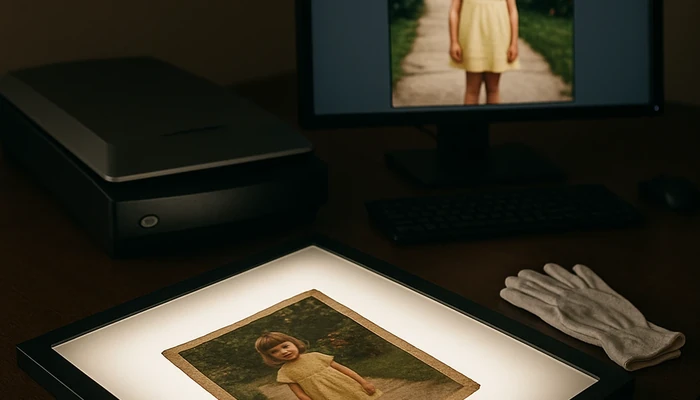
Restoration rescues faded, torn, or stained photos, often with the use of advanced scanning and editing tools. This process requires delicacy and expertise:
- Assess and clean the original photo gently.
- Scan with high-resolution settings, preferably using a flatbed scanner.
- Edit digitally to repair damage and restore color.
- Ask for professional restoration services for best results.
For in-depth techniques, review our post on photo restoration methods and consult this authoritative guide on digital restoration.
Frequently Asked Questions (FAQ) on Digital Photo Preservation
What are the benefits of digitizing old photos?
Digitizing old photos protects them from physical deterioration, makes sharing easier, and simplifies restoration or reprinting in the future.
Can smartphone cameras replace professional scanning?
While smartphone apps offer convenience, high-resolution scanners capture more detail and produce images suitable for safe archiving or large prints.
Is cloud storage safe for family photos?
Cloud storage is safe when paired with secure passwords and backup redundancy. Use both cloud and local storage for peace of mind.
How do I prevent color fading in printed photos?
Use archival-quality paper and inks, store prints out of direct sunlight, and maintain stable humidity and temperature levels.
What’s the best way to restore heavily damaged photos?
Professional restoration combines gentle cleaning, high-res scanning, and digital editing. See our black & white photo restoration guide for details, or review these expert tips for restoring damaged photos.
Can I request digital files and prints from my session?
Yes, most professional studios, including Video Studio Jimenez, offer digital and print packages to ensure longevity and versatility in displaying your images.
How often should I backup digital images?
At minimum, backup important photos once a year on both local and cloud platforms to prevent any loss due to technical failures.
How do I organize digital family archives?
Sort images by event, date, or family member. Consistent folder naming and metadata tagging help future generations locate cherished memories.
Why is restoration important even for “good” old photos?
Restoration enhances clarity, color, and removes visible damage, ensuring images look their best when archived or gifted.
Is it possible to undo mistakes during digitization?
If originals aren’t harmed, professional editing can usually correct scanning errors or minor flaws—consult a specialist if unsure.
Conclusion & Next Steps
Preserving your memories—whether through a new photography session or digitizing old family photos—requires attention, expert guidance, and a proactive approach. By understanding strategies for preserving old photos in digital format, avoiding common mistakes, and partnering with professionals like Video Studio Jimenez, you can ensure your family’s legacy is safe for generations. Ready to create or restore memories?
- Learn about our photo restoration services
- Discover our wedding photo packages
- Book your maternity photography session
Remember: review portfolios, request clear explanations of processes, and be an active participant in each session. Every family’s story is unique—your approach to photo preservation can be too.
About Video Studio Jimenez
Video Studio Jimenez is a professional photography studio serving couples and families in Chicago, Illinois and surrounding areas, offering wedding, maternity, newborn, studio portrait, passport, and specialized old photo restoration services. With years of expertise, a natural and emotive style, and meticulous attention to editing and preservation, Video Studio Jimenez ensures your memories are captured and protected for years to come.
Chicago photographer, Chicago Photo Restoration, Photo Restoration Chicago Il, old photo restoration River Forest, Photo Restoration Norridge, restore old photos Northlake, old photo restoration Glencoe, Restauración fotográfica Oak Park, professional photo restoration Bensenville, professional photo restoration Lakeview